Local Speech to Text in Qt: Record and Transcribe Offline with Whisper in C++
Add offline speech to text to a Qt 6 / QML app: capture the microphone with QAudioSource, transcribe with Whisper on a worker thread, and keep the UI responsive. No Python and no cloud API. A complete CMake project with real timings.
Speech to text in a desktop application usually means sending the user's audio to a cloud API. That rules it out for dictation in medical or legal software, for field tools with no network, and for any product that promised its users their recordings stay on their machine.
This post builds a small Qt Quick application that records from the microphone or opens an audio file and transcribes it locally with Whisper. The application links Qt and one shared library, and after the first run it needs no network. The full source is a Qt 6 CMake project in the Kjarni repository.
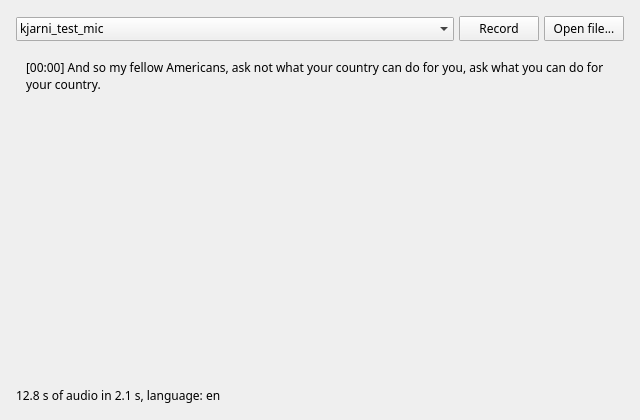
On an i7-13700, on CPU, with whisper-small:
| Input | Audio | Transcription time |
|---|---|---|
| WAV file, 16 kHz mono | 11.0 s | 2.1–2.3 s |
| Same speech through a 48 kHz stereo input | 12.8 s | 2.1 s |
Both produced the same text:
[00:00] And so my fellow Americans, ask not what your country can do for you, ask what you can do for your country.
The times do not include loading the model, which happens once at startup in the background. The input was a virtual microphone playing the recording, on Linux, so real room noise and a real microphone will be harder than this clean clip.
Building it
You need Qt 6.5 or later with the Qt Multimedia module, which is a separate option in
the Qt installer (qt6-multimedia-dev on Debian and Ubuntu), a C++23 compiler, and the
Kjarni release archive:
git clone --depth 1 https://github.com/olafurjohannsson/kjarni.git
mkdir kjarni-lib
curl -sL https://github.com/olafurjohannsson/kjarni/releases/latest/download/kjarni-x86_64-linux.tar.gz \
  | tar xz -C kjarni-lib

cmake -S kjarni/crates/kjarni-ffi/examples/qt-speech -B build \
      -DCMAKE_PREFIX_PATH=$HOME/Qt/6.8.3/gcc_64 \
      -DKJARNI_LIB_DIR=$PWD/kjarni-lib -DKJARNI_INCLUDE_DIR=$PWD/kjarni-lib
cmake --build build && ./build/kjarni_qt_speech
The first run downloads whisper-small, 925 MB, and caches it. The window stays
responsive during that, and the buttons stay disabled until the model is ready.
Loading the model off the GUI thread
Creating the transcriber can mean a large download, and always means reading the weights
from disk, so it runs on the thread pool. Passing this to .then delivers the result
back on the object's own thread, where it can touch properties QML is bound to:
QtConcurrent::run(load).then(this, [this](Loaded loaded) {
    if (!loaded.transcriber) {
        setStatus("Could not load the model: " + loaded.error);
        return;
    }
    m_transcriber = std::move(loaded.transcriber);
    setStatus("Ready. Nothing leaves this machine.");
});
load() is a thin wrapper around one Kjarni call:
auto transcriber = kjarni::Transcriber::create({.model = "whisper-small"});
Add .language = "en" if you know the language. Otherwise Whisper detects it from the
audio, which works better on full sentences than on one or two words. Use
.translate = true to get English from other languages.
Capturing the microphone
QAudioSource delivers raw bytes in whatever format the device was opened with. Asking
for 16 kHz, the rate Whisper uses, is tempting, but many devices refuse it. Open the
device at its preferred rate, ask for floats if it can provide them, and let Kjarni
resample:
QAudioFormat captureFormat(const QAudioDevice& device) {
    QAudioFormat format = device.preferredFormat();
    format.setSampleFormat(QAudioFormat::Float);
    return device.isFormatSupported(format) ? format : device.preferredFormat();
}
m_format = captureFormat(device);
m_source = std::make_unique<QAudioSource>(device, m_format);
m_stream = m_source->start();
connect(m_stream, &QIODevice::readyRead, this, &SpeechToText::capture);
Kjarni takes mono samples between -1 and 1, so each frame is mixed down.
QAudioFormat::normalizedSampleValue handles the sample format, which means the same
loop works whether the device gave you floats or 16-bit integers:
void SpeechToText::capture() {
    const QByteArray bytes = m_stream->readAll();
    const int channels = m_format.channelCount();
    const int frameSize = m_format.bytesPerFrame();
    for (qsizetype frame = 0; frame + frameSize <= bytes.size(); frame += frameSize) {
        float mono = 0.0f;
        for (int c = 0; c < channels; ++c) {
            mono += m_format.normalizedSampleValue(bytes.constData() + frame + c * m_format.bytesPerSample());
        }
        m_samples.push_back(mono / channels);
    }
}
Transcribing without freezing the window
A transcription takes seconds and uses every physical core, so it must not run on the GUI thread. When recording stops, the samples move into a worker task along with their rate:
const auto rate = static_cast<std::uint32_t>(m_format.sampleRate());
run([samples = std::move(m_samples), rate](const kjarni::Transcriber& t) {
    return t.transcribe(std::span<const float>(samples), rate);
});
A file goes through the same path. Kjarni reads wav, mp3, flac and ogg itself:
run([path = file.toLocalFile().toStdString()](const kjarni::Transcriber& t) {
    return t.transcribe_file(path);
});
The result has the full text, the language, the duration and timed segments:
for (const kjarni::Segment& s : transcript.segments) {
    // s.start and s.end in seconds, s.text
}
One transcriber serves one request at a time. The example keeps a busy property, set
before the work starts and cleared when it finishes, and QML disables the buttons while it
is true.
Exposing it to QML
Nothing in the QML knows about Whisper. It binds to a few properties:
SpeechToText { id: speech }

Button {
    text: speech.recording ? "Stop" : "Record"
    enabled: speech.ready && !speech.busy
    onClicked: speech.recording ? speech.stopRecording() : speech.startRecording()
}

TextArea { text: speech.transcript; readOnly: true }

Label { text: speech.status }
The backend is a plain QObject, so a Qt Widgets application can connect the same signals
to a QPlainTextEdit instead.
What it does not do
- Live captions. The C++ API returns the transcript when the audio has been processed, so this example transcribes after you press Stop. For rolling captions, you would send overlapping chunks yourself.
- A smaller model.
whisper-smallis 925 MB, which is a real addition to an installer.whisper-large-v3, from Kjarni 0.2.9, is a larger option: a 3.1 GB download that used about 9 GB of RAM on an 11-second clip.
If speech to text is the only thing you need, whisper.cpp is a mature choice with smaller quantized models. Kjarni makes more sense when the application also needs other models, since the same library does semantic search in Qt, embeddings, classification and local chat.
Shipping it
On Linux keep libkjarni_ffi.so next to the binary with an $ORIGIN rpath, on Windows put
kjarni_ffi.dll next to the .exe, and run linuxdeploy, windeployqt or macdeployqt
for Qt as you normally would. On macOS the application also needs
NSMicrophoneUsageDescription in its Info.plist, or the system will not give it audio.
To work offline from the first launch, the model has to be on the machine before the
application needs it. Run kjarni model download whisper-small, then ship the
openai_whisper-small folder from ~/.cache/kjarni (%LOCALAPPDATA%\kjarni on Windows)
and set KJARNI_CACHE_DIR to its parent directory before creating the transcriber.
I built and ran this on Linux with Qt 6.8.3 and Kjarni 0.2.9 (timings from 0.2.8). The Windows and macOS archives have the same API, but I have not run this example on them.
FAQ
Does it need an internet connection?
Only to download the model the first time, and not at all if you ship the model with the application. Transcription never uses the network.
Does this need Python or a GPU?
Neither. Kjarni is a native library with its own inference engine, and the timings in
this post are from the CPU. Pass .gpu = true in the options to use a GPU through Vulkan,
DirectX 12 or Metal.
Which Qt versions does it work with?
The example asks for Qt 6.5 or later, and was tested with 6.8.3. It needs the Qt Multimedia module for the microphone.
Which languages does it support?
Whisper's languages, with automatic detection by default. Set .language to an ISO code
such as "de" to skip detection, or .translate = true to get English output.
Can it transcribe while the user is speaking?
Not directly from the C++ API, which returns when the audio has been processed. You can send overlapping chunks of audio yourself.
Getting it
Example source: https://github.com/olafurjohannsson/kjarni/tree/main/crates/kjarni-ffi/examples/qt-speech
Releases:       https://github.com/olafurjohannsson/kjarni/releases
GitHub:         https://github.com/olafurjohannsson/kjarni
Related
- Semantic Search in a Qt Quick App: BM25, hybrid and reranking in QML
- Local LLM in Qt: streaming chat in the same kind of app
- Running a Local LLM from C++: chat through the same library
- Local Semantic Search in C++: the C and C++23 APIs in full
Kjarni runs the same engine on every platform: