Local LLM in Qt: An Offline AI Chat App in QML and C++
Run a local LLM inside a Qt 6 / QML application: stream tokens to the UI, stop generation, and keep conversation history, with no server and no API key. Complete source, with real timings and memory use from Llama 3.2 1B.
Adding an AI assistant to a Qt application usually means calling a cloud API, or installing a local server next to your application and talking to it over HTTP. Both leave you with something extra to run, and the first also sends your users' text to someone else's machine.
This post puts the model inside the application instead. It builds a small Qt Quick chat window that loads Llama 3.2 1B through one shared library, streams the reply into the UI as it is generated, can be stopped mid-sentence, and remembers the conversation. The complete source is below.
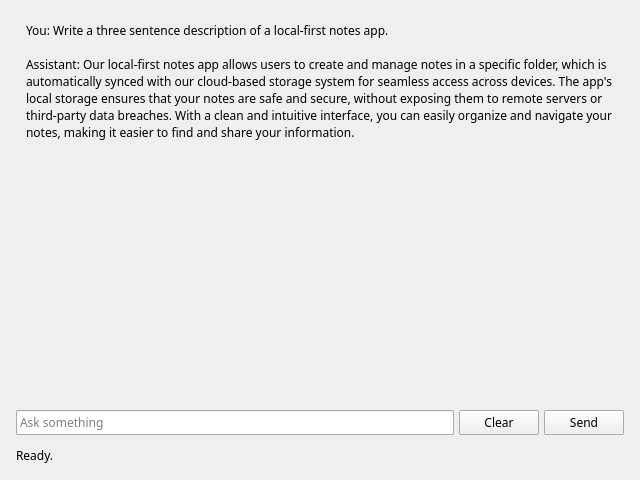
On an i7-13700, on CPU, with the 4-bit llama3.2-1b-instruct:
| Download | 780 MB |
| Loading the model from disk | about 1.3 s |
| First token | 1.1–1.9 s |
| Generation | about 21 tokens per second |
| Peak memory, whole application | about 2.5 GB |
What a 1B model can and cannot do
Set your expectations before building on this. The model in the screenshot was asked to describe a local-first notes app, and it invented cloud sync, which is the opposite of the point. In the same session, it was told a name and could not repeat it one message later, although it did correctly recall the topic of an earlier question.
A small model is reasonable for rewriting text, drafting, and short explanations a user
will check. It is not a reliable source of facts, so do not put its output in front of
users as if it were. kjarni model list shows the larger models, which use more memory and
generate more slowly on a CPU.
If raw generation speed is what matters most, llama.cpp is faster on CPU today. The case for Kjarni in a Qt application is one library for everything: semantic search, speech to text and chat, with the same API style and no separate server.
Building it
You need Qt 6.5 or later, a C++23 compiler, and the Kjarni release archive. Put the five files below in a folder, then:
mkdir kjarni-lib
curl -sL https://github.com/olafurjohannsson/kjarni/releases/latest/download/kjarni-x86_64-linux.tar.gz \
  | tar xz -C kjarni-lib

cmake -B build -DCMAKE_PREFIX_PATH=$HOME/Qt/6.8.3/gcc_64 -DKJARNI_DIR=$PWD/kjarni-lib
cmake --build build && ./build/kjarni_qt_chat
The first run downloads the model. The window stays responsive during the download, and Send stays disabled until the model is ready.
cmake_minimum_required(VERSION 3.21)
project(kjarni_qt_chat LANGUAGES CXX)

set(CMAKE_CXX_STANDARD 23)   # std::expected in kjarni.hpp
set(CMAKE_CXX_STANDARD_REQUIRED ON)

find_package(Qt6 6.5 REQUIRED COMPONENTS Quick Concurrent)
qt_standard_project_setup(REQUIRES 6.5)

qt_add_executable(kjarni_qt_chat main.cpp)
qt_add_qml_module(kjarni_qt_chat
    URI KjarniChat
    QML_FILES Main.qml
    SOURCES localchat.h localchat.cpp)

target_include_directories(kjarni_qt_chat PRIVATE "${KJARNI_DIR}")
target_link_directories(kjarni_qt_chat PRIVATE "${KJARNI_DIR}")
target_link_libraries(kjarni_qt_chat PRIVATE Qt6::Quick Qt6::Concurrent kjarni_ffi)
set_target_properties(kjarni_qt_chat PROPERTIES BUILD_RPATH "${KJARNI_DIR}")
Conversation history
kjarni::Chat in the C++ wrapper answers each message on its own, with no memory of
earlier turns. For a chat window you want the conversation API in the C header, which adds
each message and reply to its history:
kjarni_chat_conversation_new(session->chat, &session->conversation);
kjarni_chat_conversation_stream(session->conversation, text, nullptr, callback, &context, nullptr);
kjarni_chat_conversation_clear(session->conversation, /*keep_system=*/1);
A reply you stop early still goes into the history, so the model can refer to that turn afterwards.
Streaming tokens to QML
Generation takes seconds and uses every physical core, so it runs on the thread pool. The callback runs on that worker thread, where it must not touch anything QML is bound to. Emitting a signal solves that: the receiver lives on the GUI thread, so Qt queues the call.
const auto callback = [](const char* token, void* userData) -> bool {
    auto* ctx = static_cast<StreamContext*>(userData);
    emit ctx->owner->tokenProduced(QString::fromUtf8(token));
    return !ctx->stop->load();
};
The return value is how Stop works: false ends generation at the next token. The flag is
atomic because the GUI thread sets it while the worker reads it. Stop cannot interrupt the
wait for the first token, so during that second or so it takes effect when the first token
arrives.
The worker also uses this, so the destructor sets the flag and waits for the worker to
finish before the object goes away. Without that, closing the window during a reply would
crash.
One conversation serves one request at a time, so send returns immediately if a reply is
in progress, and QML turns Send into Stop while generating is true.
The complete source
main.cpp:
#include <QGuiApplication>
#include <QQmlApplicationEngine>

int main(int argc, char* argv[]) {
    QGuiApplication app(argc, argv);

    QQmlApplicationEngine engine;
    QObject::connect(&engine, &QQmlApplicationEngine::objectCreationFailed, &app,
                     [] { QCoreApplication::exit(1); }, Qt::QueuedConnection);
    engine.loadFromModule("KjarniChat", "Main");

    return app.exec();
}
localchat.h:
#pragma once

#include <QFuture>
#include <QObject>
#include <QString>
#include <QtQml/qqmlregistration.h>

#include <atomic>
#include <memory>

struct ChatSession;

class LocalChat : public QObject {
    Q_OBJECT
    QML_ELEMENT
    Q_PROPERTY(bool ready READ ready NOTIFY stateChanged)
    Q_PROPERTY(bool generating READ generating NOTIFY stateChanged)
    Q_PROPERTY(QString status READ status NOTIFY stateChanged)
    Q_PROPERTY(QString transcript READ transcript NOTIFY transcriptChanged)

public:
    explicit LocalChat(QObject* parent = nullptr);
    ~LocalChat() override;

    bool ready() const { return m_session != nullptr; }
    bool generating() const { return m_generating; }
    QString status() const { return m_status; }
    QString transcript() const { return m_transcript; }

    Q_INVOKABLE void send(const QString& message);
    Q_INVOKABLE void stop() { m_stop = true; }
    Q_INVOKABLE void clear();

signals:
    void stateChanged();
    void transcriptChanged();
    void tokenProduced(const QString& token);

private:
    void setStatus(const QString& status);

    std::shared_ptr<ChatSession> m_session;
    QFuture<void> m_work;
    std::atomic<bool> m_stop = false;
    bool m_generating = false;
    QString m_status = "Loading the model...";
    QString m_transcript;
};
localchat.cpp:
#include "localchat.h"

#include <QtConcurrent>

#include "kjarni.h"

// A loaded model and the conversation that remembers its turns.
struct ChatSession {
    KjarniChat* chat = nullptr;
    KjarniChatConversation* conversation = nullptr;

    ~ChatSession() {
        kjarni_chat_conversation_free(conversation);
        kjarni_chat_free(chat);
    }
};

namespace {

QString lastError() {
    return QString::fromUtf8(kjarni_last_error_message());
}

std::shared_ptr<ChatSession> load(QString* error) {
    KjarniChatConfig config = kjarni_chat_config_default();
    config.model_name = "llama3.2-1b-instruct";
    config.system_prompt =
        "You are a concise assistant inside a desktop application. Answer in a few sentences.";
    config.quantized = 1;
    config.quiet = 1;

    auto session = std::make_shared<ChatSession>();
    if (kjarni_chat_new(&config, &session->chat) != KJARNI_ERROR_CODE_OK ||
        kjarni_chat_conversation_new(session->chat, &session->conversation) != KJARNI_ERROR_CODE_OK) {
        *error = lastError();
        return nullptr;
    }
    return session;
}

struct StreamContext {
    LocalChat* owner;
    const std::atomic<bool>* stop;
};

}  // namespace

LocalChat::LocalChat(QObject* parent) : QObject(parent) {
    // Emitted on the worker, delivered on this object's thread: a signal crossing
    // threads is queued, so the transcript is only ever touched on the GUI thread.
    connect(this, &LocalChat::tokenProduced, this, [this](const QString& token) {
        m_transcript += token;
        emit transcriptChanged();
    });

    m_work = QtConcurrent::run([] {
        QString error;
        auto session = load(&error);
        return std::make_pair(std::move(session), error);
    }).then(this, [this](std::pair<std::shared_ptr<ChatSession>, QString> loaded) {
        if (!loaded.first) {
            setStatus("Could not load the model: " + loaded.second);
            return;
        }
        m_session = std::move(loaded.first);
        setStatus("Ready. Nothing leaves this machine.");
    });
}

// The worker holds `this` to emit tokens, so it has to finish before the object goes.
LocalChat::~LocalChat() {
    m_stop = true;
    m_work.waitForFinished();
}

void LocalChat::send(const QString& message) {
    if (!ready() || m_generating || message.trimmed().isEmpty()) {
        return;
    }
    m_generating = true;
    m_stop = false;
    m_transcript += "You: " + message + "\n\nAssistant: ";
    emit transcriptChanged();
    setStatus("Generating...");

    m_work = QtConcurrent::run([this, session = m_session, text = message.toStdString()] {
        StreamContext context{this, &m_stop};
        // Returning false from the callback ends generation.
        const auto callback = [](const char* token, void* userData) -> bool {
            auto* ctx = static_cast<StreamContext*>(userData);
            emit ctx->owner->tokenProduced(QString::fromUtf8(token));
            return !ctx->stop->load();
        };
        const KjarniErrorCode code = kjarni_chat_conversation_stream(
            session->conversation, text.c_str(), nullptr, callback, &context, nullptr);
        return code == KJARNI_ERROR_CODE_OK ? QString{} : lastError();
    }).then(this, [this](const QString& error) {
        m_generating = false;
        m_transcript += "\n\n";
        emit transcriptChanged();
        setStatus(error.isEmpty() ? "Ready." : "Generation failed: " + error);
    });
}

void LocalChat::clear() {
    if (!ready() || m_generating) {
        return;
    }
    kjarni_chat_conversation_clear(m_session->conversation, /*keep_system=*/1);
    m_transcript.clear();
    emit transcriptChanged();
}

void LocalChat::setStatus(const QString& status) {
    m_status = status;
    emit stateChanged();
}
Main.qml:
import QtQuick
import QtQuick.Controls
import QtQuick.Layouts
import KjarniChat

ApplicationWindow {
    width: 640
    height: 480
    visible: true
    title: "Local chat"

    LocalChat { id: chat }

    ColumnLayout {
        anchors.fill: parent
        anchors.margins: 16
        spacing: 12

        ScrollView {
            Layout.fillWidth: true
            Layout.fillHeight: true
            TextArea {
                text: chat.transcript
                readOnly: true
                wrapMode: TextEdit.Wrap
            }
        }

        RowLayout {
            TextField {
                id: input
                Layout.fillWidth: true
                placeholderText: "Ask something"
                onAccepted: send.clicked()
            }
            Button {
                text: "Clear"
                enabled: chat.ready && !chat.generating
                onClicked: chat.clear()
            }
            Button {
                id: send
                text: chat.generating ? "Stop" : "Send"
                enabled: chat.ready
                onClicked: {
                    if (chat.generating) {
                        chat.stop()
                    } else {
                        chat.send(input.text)
                        input.clear()
                    }
                }
            }
        }

        Label { text: chat.status }
    }
}
To use a different model, change model_name in load(). Set quantized to 0 for full
precision weights, which take more memory and generate more slowly on a CPU.
Shipping it
On Linux keep libkjarni_ffi.so next to the binary with an $ORIGIN rpath, on Windows put
kjarni_ffi.dll next to the .exe, and run linuxdeploy, windeployqt or macdeployqt
for Qt as you normally would. For an application that works offline from the first launch,
ship the model folder from ~/.cache/kjarni (%LOCALAPPDATA%\kjarni on Windows) and set
KJARNI_CACHE_DIR to its parent directory before loading the model.
I built and ran this on Linux with Qt 6.8.3 and Kjarni 0.2.9 (timings from 0.2.8), driving the window from a test program rather than by hand. I have not run it on Windows or macOS.
FAQ
Does it need a server such as Ollama?
No. The model runs inside the application's process through one shared library, so there is no port, no background service and nothing else to install.
Does it need an internet connection?
Only to download the model the first time, and not at all if you ship the model with the application. Generation never uses the network.
Does it need a GPU?
No. The numbers in this post are from a CPU. Set config.device to KJARNI_DEVICE_GPU to
use a GPU through Vulkan, DirectX 12 or Metal.
How much memory does it need?
The whole application peaked at about 2.5 GB with Llama 3.2 1B, measured on Linux. Larger models need more.
Why not use kjarni::Chat from kjarni.hpp?
It is simpler, but it does not keep history between calls. It suits one-off tasks such as
rewriting a paragraph. A chat window needs the conversation API in kjarni.h.
Getting it
Releases: https://github.com/olafurjohannsson/kjarni/releases
GitHub:   https://github.com/olafurjohannsson/kjarni
Related
- Local Speech to Text in Qt: Whisper and the microphone in the same kind of app
- Semantic Search in a Qt Quick App: BM25, hybrid and reranking in QML
- Running a Local LLM from C++: the C++ wrapper without Qt
Kjarni runs the same engine on every platform: