Semantic Search in a Qt Quick App: BM25, Hybrid and Reranking in C++
Add keyword, semantic and hybrid search with cross-encoder reranking to a Qt 6 / QML application, running locally in C++ with no Python, no ONNX Runtime and no server. A complete working example with real results.
A desktop application with a search box usually gets keyword search: match the words the user typed against the words in the documents. It is fast and predictable, and it fails the moment the user describes the problem in their own words instead of yours.
This post builds a help-centre search in Qt Quick that does three kinds of retrieval behind one toggle, keyword (BM25), semantic and hybrid, plus a button that reranks the results with a cross-encoder. Everything runs inside the application's process through one shared library. The full source is a Qt 6 CMake project in the Kjarni repository.
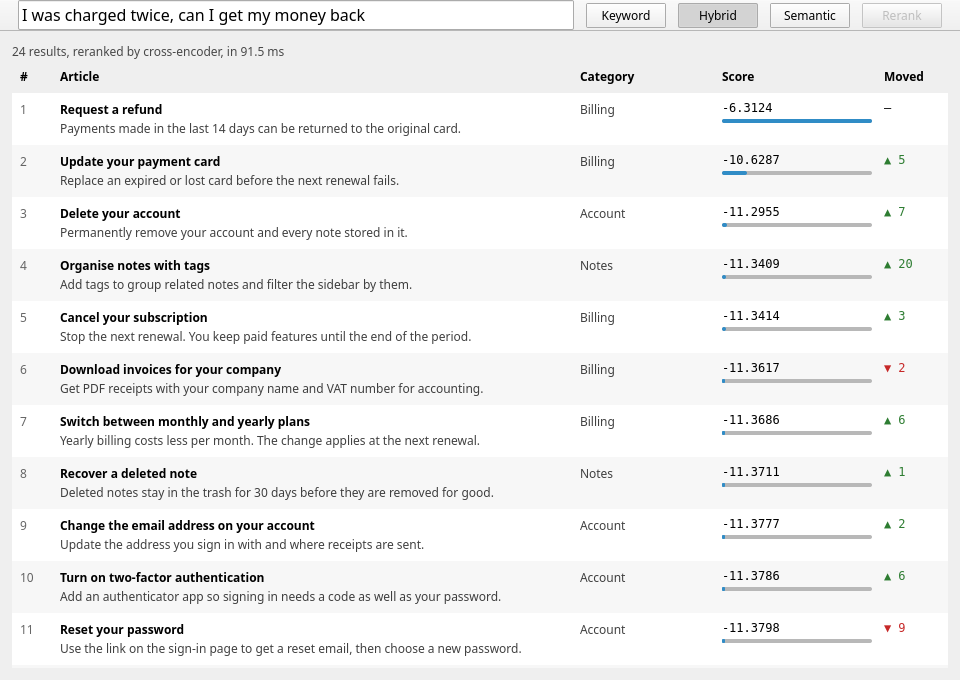
What the three modes do with the same query
The demo indexes 24 short help articles for a made-up notes app. Here is what each mode returns for I was charged twice, can I get my money back:
| Mode | Time | Top results |
|---|---|---|
| Keyword (BM25) | 0.1 ms | Download invoices for your company, Reset your password, Encrypt a notebook |
| Semantic | 5 ms | Request a refund (0.48), Update your payment card, Cancel your subscription |
| Hybrid | 6 ms | Request a refund, Reset your password, Stop sharing a note |
| Hybrid, reranked | 84–92 ms | Request a refund (−6.3), Update your payment card (−10.6), Delete your account (−11.3) |
Keyword search puts an invoice article first because it matched incidental words such as get and can. The article the user needs, Request a refund, does not contain charged, twice or money, and comes fifth. Semantic search finds it at once, because "get my money back" and "payments can be returned" mean the same thing. Hybrid fuses the two rankings, so it gets the refund right but inherits some keyword noise underneath.
The second query makes the gap starker. I forgot my login shares no word with any article, so keyword search returns nothing at all. Semantic search ranks Reset your password first at 0.50.
Building it
You need Qt 6.5 or later, the example source, and the Kjarni release archive, which holds the shared library and the two headers:
git clone --depth 1 https://github.com/olafurjohannsson/kjarni.git
mkdir kjarni-lib
curl -sL https://github.com/olafurjohannsson/kjarni/releases/latest/download/kjarni-x86_64-linux.tar.gz \
  | tar xz -C kjarni-lib

cmake -S kjarni/crates/kjarni-ffi/examples/qt -B build \
      -DCMAKE_PREFIX_PATH=$HOME/Qt/6.8.3/gcc_64 \
      -DKJARNI_LIB_DIR=$PWD/kjarni-lib -DKJARNI_INCLUDE_DIR=$PWD/kjarni-lib
cmake --build build && ./build/kjarni_qt_search
The CMake side is ordinary: link kjarni_ffi like any other library and put the headers
on the include path.
find_package(Qt6 6.5 REQUIRED COMPONENTS Quick Concurrent)

qt_add_executable(kjarni_qt_search main.cpp)
qt_add_qml_module(kjarni_qt_search
    URI KjarniSearch
    QML_FILES Main.qml
    SOURCES helpsearch.h helpsearch.cpp articles.h)

target_include_directories(kjarni_qt_search PRIVATE "${KJARNI_INCLUDE_DIR}")
target_link_directories(kjarni_qt_search PRIVATE "${KJARNI_LIB_DIR}")
target_link_libraries(kjarni_qt_search PRIVATE Qt6::Quick Qt6::Concurrent kjarni_ffi)
The first run downloads the embedding model, 88 MB, and caches it. After that the application works offline.
Indexing on a worker thread
Kjarni's indexer builds the keyword index and the vector index together, from files. The demo writes each article to a temporary folder, one file per article, and indexes the folder:
KjarniIndexerConfig icfg = kjarni_indexer_config_default();
icfg.model_name = "minilm-l6-v2";
icfg.quiet = 1;
KjarniIndexer* indexer = nullptr;
kjarni_indexer_new(&icfg, &indexer);

const char* inputs[] = {articlesDir.constData()};
KjarniIndexStats stats{};
kjarni_indexer_create(indexer, indexPath.constData(), inputs, 1, /*force=*/1, &stats);
kjarni_indexer_free(indexer);
The file name carries the article's position, so a search result can find its way back
to the article through the source field of its metadata. In a real application the
files would be your documentation, and the index would live somewhere persistent rather
than in a temporary folder.
Loading the model and encoding every article takes seconds, not milliseconds, so it must
not run on the GUI thread. QtConcurrent::run with a continuation does the work on the
thread pool and delivers the result back on the object's own thread:
QtConcurrent::run([] { return std::make_shared<Loaded>(load()); })
    .then(this, [this](std::shared_ptr<Loaded> loaded) {
        if (!loaded->searcher) {
            setStatus("Could not build the index: " + loaded->error);
            return;
        }
        m_searcher = std::move(loaded->searcher);
        emit readyChanged();
    });
Passing this as the context to .then is what puts the continuation on the GUI thread,
where it can touch properties QML is bound to. The shared_ptr is there because the
loaded state holds move-only handles.
Searching as the user types
A search is one call with the mode in its options:
KjarniSearchOptions opts = kjarni_search_options_default();
opts.mode = KJARNI_SEARCH_MODE_HYBRID;   // or _KEYWORD, _SEMANTIC
opts.top_k = 24;

KjarniSearchResults found{};
kjarni_searcher_search_with_options(searcher, index, query, &opts, &found);
for (std::size_t i = 0; i < found.len; ++i) {
    const KjarniSearchResult& r = found.results[i];
    // r.score, r.text, and r.metadata_json with the source file
}
kjarni_search_results_free(found);
Encoding one short query is a single forward pass of a 22M-parameter model, and the whole search took 5 to 6 ms on an i7-13700. That is fast enough to run on the GUI thread on every keystroke. A larger embedding model or a much larger corpus would move it to a worker the same way as indexing.
Reranking on request
Retrieval compares a query vector with document vectors that were computed separately. A cross-encoder reads the query and the document together, which is much more precise and much slower, so it runs as a second pass over whatever retrieval returned. In the demo it runs on a worker thread, and the cross-encoder loads the first time the button is pressed:
auto reranker = kjarni::Reranker::create();          // once
auto ranked = reranker->rerank(query, documents);    // documents: std::vector<std::string>
for (const kjarni::Ranked& r : *ranked) {
    // r.index points back into `documents`; r.score is a logit
}
Reranking all 24 results took 84 to 92 ms, and on the refund query it did what it is for: the right answer at −6.3 with a wide gap to the next result at −10.6, and Update your payment card, a sensible second answer, moved up from seventh.
The scores are logits, not similarities. Around −10 and below means the model does not consider the document an answer, and that is worth reading as a signal. On I forgot my login, every article scored between −10 and −11, and the reranker put Delete your account just above Reset your password, at −10.16 against −10.35. That is a small general-purpose cross-encoder telling you it is not confident about any of them, and a case where the semantic ranking alone was better. Rerank the top few results rather than everything, and treat a page of uniformly low scores as "no good match".
Exposing it to QML
The backend is one QObject registered with QML_ELEMENT. The search mode is a
Q_ENUM whose values are Kjarni's own constants, so the QML toggle sets them directly:
class HelpSearch : public QObject {
    Q_OBJECT
    QML_ELEMENT
public:
    enum Mode { Keyword = KJARNI_SEARCH_MODE_KEYWORD,
                Semantic = KJARNI_SEARCH_MODE_SEMANTIC,
                Hybrid = KJARNI_SEARCH_MODE_HYBRID };
    Q_ENUM(Mode)

    Q_PROPERTY(Mode mode READ mode WRITE setMode NOTIFY modeChanged)
    Q_PROPERTY(QVariantList results READ results NOTIFY resultsChanged)
    // ready, status, reranked, rerankerLoading, elapsedMs …

    Q_INVOKABLE void search(const QString& query);
    Q_INVOKABLE void rerank();
};
HelpSearch { id: search }

TextField { onTextChanged: search.search(text) }

Button {
    text: "Semantic"
    checkable: true
    checked: search.mode === HelpSearch.Semantic
    onClicked: search.mode = HelpSearch.Semantic
}

ListView { model: search.results /* rank, title, body, category, score */ }
Nothing in the QML knows about embeddings. It binds to a list and a few flags, which
also means the same backend works under Qt Widgets with a QTableView in place of the
ListView.
Shipping it
The application links one shared library. On Linux keep libkjarni_ffi.so next to the
binary with an $ORIGIN rpath, on Windows put kjarni_ffi.dll next to the .exe, and
run linuxdeploy, windeployqt or macdeployqt for Qt as you normally would. Kjarni
itself needs nothing else: no Python, no ONNX Runtime and no CUDA.
Kjarni on Windows lists every file in the Windows archive.
To work offline from the first launch, ship the model folder with the application and
pass its path as cache_dir in the indexer and searcher configs. Models download into
~/.cache/kjarni or %LOCALAPPDATA%\kjarni otherwise.
FAQ
Does this need Python or ONNX Runtime?
No. Kjarni is a native library with its own inference engine and tokenizer, and it reads
the HuggingFace model files directly. The application links kjarni_ffi and Qt and
nothing else.
Which Qt versions does it work with?
The example uses Qt 6.5 or later, for qt_add_qml_module, QML_ELEMENT and
QFuture::then with a context object. The Kjarni calls themselves are plain C and work
from any Qt version, including Qt 5 with Qt Widgets.
What is the difference between keyword, semantic and hybrid search?
Keyword search (BM25) scores documents by the words they share with the query, weighted by how rare each word is. Semantic search compares embeddings, so it matches meaning even with no words in common. Hybrid runs both and fuses the two rankings, which helps when queries contain exact terms such as product names or error codes that embeddings blur.
When should I use the reranker?
When the order of the first few results matters more than speed. It costs roughly 4 ms per document on a desktop CPU in this demo, so rerank the top 10 to 20 retrieved results, not the whole collection, and do it on a worker thread.
Can I use it with Qt Widgets instead of QML?
Yes. The backend is a QObject with a QVariantList of results. Feed the same data to a
QAbstractTableModel and show it in a QTableView.
Does it run on Windows and macOS?
Yes. The release archives cover Linux x64 and arm64, macOS on Apple Silicon, and Windows x64.
Getting it
Example source: https://github.com/olafurjohannsson/kjarni/tree/main/crates/kjarni-ffi/examples/qt
Releases:       https://github.com/olafurjohannsson/kjarni/releases
GitHub:         https://github.com/olafurjohannsson/kjarni
Related
- Local Semantic Search in C++: the C and C++23 APIs in full
- Running a Local LLM from C++: chat through the same library
- Build a Document Search Engine in C#: the same hybrid search and reranking from .NET
- Kjarni on Windows: every file and where it comes from
Kjarni runs the same engine on every platform: